PDF Reader Pro - Reader&Editor
Contains adsIn-app purchases
4.0star
21.1K reviewsinfo
5M+
Downloads

USK: All ages
info






About this app
PDF Reader Pro is well received by more than 90 million people in over 200 countries. With a clean and easy-to-use interface, It may be your last and best PDF Reader & Editor. Moreover, it boosts your productivity and help you read, annotate and manage PDF files on the go.
PDF Reader Pro was recognized by G2 as High Performer in Customer Satisfaction in Winter 2023 for File Reader Software and was proud to be included in GetApp's 2022 Category Leaders Report for PDF Software.
Free download and get the all-in-one PDF office to view, comment, convert, edit, watermark, merge, encrypt, sign, fill form, and share PDF on your Android device now!
HIGHLIGHTS:
* Read PDFs with fast viewing engine and smooth navigation
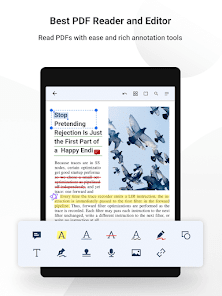
* Annotate PDF with highlight, underline, signatures, stamps, audios, links and more
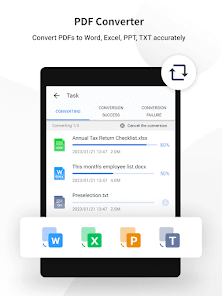
* Convert PDFs to Word, Excel, PPT or TXT with all your fonts and formatting preserved
* Export PDF to images or images to PDF easily
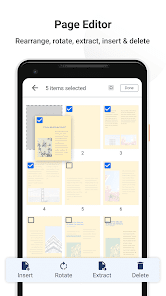
* Organize PDF pages freely, support to merge, extract, insert, reorder, rotate and delete PDF pages
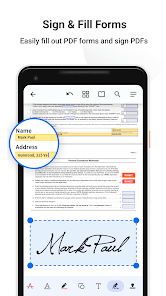
* Fill and sign any PDF forms with interactive fields
* Protect your PDFs with encryptions or text & image watermarks
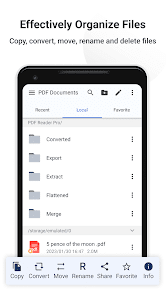
* Organize your files to edit your folders & favorite folders or PDFs
* Scan images, receipts and notes into PDFs with Mobile scanner
* Transfer files from PC to Android via WiFi Transfer
PDF Reader
· Read and quickly work across multiple PDFs with multi-tab viewer
· Customizable background theme colors for comfortable PDF reading
· Continuous vertical scrolling while viewing in single page, two page, and book modes
· Crop or full screen mode to fit small screens
· Jump to specific sections easily with outline / bookmark navigation
· Search to find text fast in your PDF documents
· Open password to view your PDFs
· Print PDFs directly from your device with all annotations
PDF Annotator
· Markup PDFs with highlight, underline, squiggly, notes, freehand, etc
· Sign PDFs with handwritten and image signatures
· Insert images and place where you want it to be
· Make audio notes to record sound at any moment
· Add hyperlinks to redirect to other destinations(URL, Email, Pages)
· Insert custom stamps like text and image stamps to secure your files
· Access to and see all annotations with the annotation summary
PDF Converter/Scanner/Creator
· Convert PDFs to Word, Excel, PPT, TXT without any restriction
· Convert PDF to images or images to PDF for a quick sharing
· Scan images, receipts, notes into PDFs with PDF Reader Pro
· Create PDF file from scanned images
Page Editor
· Reorganize pages, drag and drop to renumber and rearrange PDFs
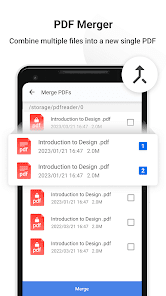
· Merge PDFs by combining multiple pages into a new PDF
· Split / extract pages from PDF to create a new document
· Insert blank / ruled / music / squared pages to PDFs
· Rotate one or more pages casually
· Delete / remove pages from PDFs
Form Filler
· Work with static PDF forms created in Adobe Acrobat
· Fill out any PDF forms with interactive fields such as text fields, checkboxes, etc
· Fill out, save, and send PDF forms
PDF Security
· Encrypt to protect sensitive PDFs and your privacy
· Add text or image watermarks to keep your PDFs safe and secure
Organize/Manage Files
· Able to create, rename, delete folders to organize your files
· Customize your favorite folder and move, rename or cancel it
· Support to get files in SD card and USB flash disk
· Flatten PDFs to make the contents static
· Grid view shows thumbnail previews of PDFs
· Enable to read the Adobe & Foxit PDF files
Share
· Use WiFi Transfer to share files across devices
· Share files via email, bluetooth, message, etc
Support Various File Types
· MS Office documents(DOCX/DOC, XLSX/XLS, PPTX)
· Image files (PNG/JPG)
· Comic files (ePub)
· Text (TXT)
Pleasure to hear from your feedback via support@pdfreaderpro.com
or check out https://www.pdfreaderpro.com
Twitter - https://twitter.com/PDFReaderPro
Facebook - https://www.facebook.com/PDFProApp
PDF Reader Pro was recognized by G2 as High Performer in Customer Satisfaction in Winter 2023 for File Reader Software and was proud to be included in GetApp's 2022 Category Leaders Report for PDF Software.
Free download and get the all-in-one PDF office to view, comment, convert, edit, watermark, merge, encrypt, sign, fill form, and share PDF on your Android device now!
HIGHLIGHTS:
* Read PDFs with fast viewing engine and smooth navigation
* Annotate PDF with highlight, underline, signatures, stamps, audios, links and more
* Convert PDFs to Word, Excel, PPT or TXT with all your fonts and formatting preserved
* Export PDF to images or images to PDF easily
* Organize PDF pages freely, support to merge, extract, insert, reorder, rotate and delete PDF pages
* Fill and sign any PDF forms with interactive fields
* Protect your PDFs with encryptions or text & image watermarks
* Organize your files to edit your folders & favorite folders or PDFs
* Scan images, receipts and notes into PDFs with Mobile scanner
* Transfer files from PC to Android via WiFi Transfer
PDF Reader
· Read and quickly work across multiple PDFs with multi-tab viewer
· Customizable background theme colors for comfortable PDF reading
· Continuous vertical scrolling while viewing in single page, two page, and book modes
· Crop or full screen mode to fit small screens
· Jump to specific sections easily with outline / bookmark navigation
· Search to find text fast in your PDF documents
· Open password to view your PDFs
· Print PDFs directly from your device with all annotations
PDF Annotator
· Markup PDFs with highlight, underline, squiggly, notes, freehand, etc
· Sign PDFs with handwritten and image signatures
· Insert images and place where you want it to be
· Make audio notes to record sound at any moment
· Add hyperlinks to redirect to other destinations(URL, Email, Pages)
· Insert custom stamps like text and image stamps to secure your files
· Access to and see all annotations with the annotation summary
PDF Converter/Scanner/Creator
· Convert PDFs to Word, Excel, PPT, TXT without any restriction
· Convert PDF to images or images to PDF for a quick sharing
· Scan images, receipts, notes into PDFs with PDF Reader Pro
· Create PDF file from scanned images
Page Editor
· Reorganize pages, drag and drop to renumber and rearrange PDFs
· Merge PDFs by combining multiple pages into a new PDF
· Split / extract pages from PDF to create a new document
· Insert blank / ruled / music / squared pages to PDFs
· Rotate one or more pages casually
· Delete / remove pages from PDFs
Form Filler
· Work with static PDF forms created in Adobe Acrobat
· Fill out any PDF forms with interactive fields such as text fields, checkboxes, etc
· Fill out, save, and send PDF forms
PDF Security
· Encrypt to protect sensitive PDFs and your privacy
· Add text or image watermarks to keep your PDFs safe and secure
Organize/Manage Files
· Able to create, rename, delete folders to organize your files
· Customize your favorite folder and move, rename or cancel it
· Support to get files in SD card and USB flash disk
· Flatten PDFs to make the contents static
· Grid view shows thumbnail previews of PDFs
· Enable to read the Adobe & Foxit PDF files
Share
· Use WiFi Transfer to share files across devices
· Share files via email, bluetooth, message, etc
Support Various File Types
· MS Office documents(DOCX/DOC, XLSX/XLS, PPTX)
· Image files (PNG/JPG)
· Comic files (ePub)
· Text (TXT)
Pleasure to hear from your feedback via support@pdfreaderpro.com
or check out https://www.pdfreaderpro.com
Twitter - https://twitter.com/PDFReaderPro
Facebook - https://www.facebook.com/PDFProApp
Updated on
Safety starts with understanding how developers collect and share your data. Data privacy and security practices may vary based on your use, region, and age. The developer provided this information and may update it over time.

This app may share these data types with third parties
Financial info, App activity and 2 others

No data collected
Learn more about how developers declare collection

Data is encrypted in transit

Data can’t be deleted
Ratings and reviews
4.1
20K reviews

larry dooby
- Flag inappropriate
August 19, 2023
Ads, ads, ads, every single button you push, even the help menu just to find out how to use this thing leads to ads. This is not user-friendly, and you have to keep clicking clickbait.
10 people found this review helpful

Red
- Flag inappropriate
September 15, 2023
This app has proved to be very useful for me . I have been using it's basic free functions and I still have access to a lot of tools.

Yani
- Flag inappropriate
September 21, 2023
Scam useless app - blocks your phone buttons so you can't go back while coppying your phone data!
What's new
Latest updates:
- Upgrade PDF converter tool. The powerful PDF Converter enables you to convert PDFs to fully-editable Word, Excel, PPT, Text. Convert PDFs to and from images is also available. Productivity improved
- Fix bugs and optimize performance to deliver a more friendly user experience
Any questions or feedback are welcome to contact us at support @ pdfreaderpro.com
- Upgrade PDF converter tool. The powerful PDF Converter enables you to convert PDFs to fully-editable Word, Excel, PPT, Text. Convert PDFs to and from images is also available. Productivity improved
- Fix bugs and optimize performance to deliver a more friendly user experience
Any questions or feedback are welcome to contact us at support @ pdfreaderpro.com


